Social media has an influence on Search Engine Optimization (SEO) in several ways. Some people believe that Google and the other search engines use social media platform for getting high rank. The concept that lies here is that the more number of Facebook likes you can get and the Google Plus 1s and Tweets a site will have, the more popular the website is considered to be. Thus, it will ensure that the website is of high quality, thereby confirming high ranking of the website in the major search engines.

Social media – What should you know about it?

The main objective of social media is to develop a brand and enhance the visibility of the brand. Social media has gained a lot of popularity in the present world. As such, the more you can promote your brand on social media platform, the more number of people will be able to know about it.

The advantage of social media is you may use it to build good relationships with your probable clients. With social media management, you can interact with innumerable people and businesses before they may turn out to be your permanent customers. People will definitely want to gather more information about the company they want to do business with, before they decide to get committed to it. As such, social media management s believed to be a great way for getting this information.

Social media enables the potential and the permanent customers to know about the brand you are promoting. This can be done in the form of some particular campaigns and updating people about the recent changes. Brands reveal that they are up to date with the latest happenings in the industry. As such, they may comment on industry developments and get engaged with customers, probable customers and competitors. This will enable you to produce new business and hold your customers too.

Search Engine Optimization – How is it different from social media?

SEO is not similar to social media. The main objective of SEO has three stages – improve the search engine ranking, which will increase the traffic to a website, leading to an increase in the business. The main objective of SEO is to increase business. This means you must use the right keyword for improving your business.

SEO enables a website to look much more attractive in the search engines. Yo need to have the most appropriate content, good links and a blog are that will enable your website to get a good ranking in the search engines.

SEO and social media are very much different from each other. Social media is about branding and interacting with the clients and probable customers while SEO is about increasing the rankings in the search engine results which may lead to high quality traffic. The objective of both is to enhance business. Social media will conduct this by communicating with people and letting them know of the brand. On the other hand, SEO will be doing it by improving the rankings for the things that the possible clients may search for when they want to buy any product or service.

Author Bio:

G. Adams is a financial writer and contributes his articles to different blogs and websites. He is associated with several finance communities as a Guest author and forum member.

In the past few years, the online marketing strategies have changed drastically. With the Panda and Penguin algorithm updates, most of the websites have lost their ranking. However, Google updates haven’t devastated all the online marketers. Those who practise white hat seo have not been affected like the marketers who employed black hat seo techniques. The ranking of the sites plummet as the online marketers employ online seo techniques. The websites run  without the assistance of a dedicated marketing team to test and tweak the strategies have experienced steady dropping of the website ranking. If your website ranking has dropped due to the latest algorithm updates of Google, then you’re required to follow the most important online marketing strategies given below. Online Marketing Strategy
Here are some of the effective online marketing strategies that you can consider while creating online marketing strategy:
1. Create a brand name before approaching the market audience: A brand name and image is really crucial in this marketing world. Your brand name will make you different from your competitors. So, you need to select a name, trademark, website along with a business plan before designing any strategy.
2. Analyze your competitors: Before you launch your own website, you’re required to analyze your competitors sale process that is inclusive of the marketing strategies. Make sure you check the past and the present of the marketing strategies of the largest competitor in the business. It can help you understand their marketing strategies and employ them while implementing your own online marketing strategy.
3. Evaluate your target audience: Make sure you evaluate your target audience and the niche market as these factors can help you designing your online strategies. Your online marketing strategies are based on the demographic instead of all the online consumers. If you’re aware of the niche audience, then it can be easier for your to market your product or service or plan your online marketing strategies.
4. Social network – One of the effective marketing strategies: Facebook, Twitter, Google+ are some of the popular social networking sites that can help you bring positive result when you promote your product or service through these social networking sites.
5. Create videos for YouTube: Make sure you create videos for YouTube as it’s considered to be a powerful platform for marketing an online business. You can share the videos of your products and share necessary information with the target audience.
When you promote your product with the help of the video online, you’re required to keep the following things in mind like:

  • A keyword-researched headline
  • A clear editorial message
  • A call to action

6. Employ proper search engine optimization technique: Online marketing is incomplete without a proper search engine optimization technique. If you employ right SEO techniques, then your website may rank on top of the search engine result. When you employ SEO techniques, you’re required to keep the following things in mind:

  • Relevant Keywords
  • Valuable Content that is Shared
  • A Website that Loads Quickly
  • Both Images & Content
  • Backlinks from Respected Websites

Therefore, you’re required to keep the above mentioned points in mind when you plan to employ online marketing strategies to promote your online business.

Author Bio:

G. Adams is a financial writer and contributes his articles to different blogs and websites. He is associated with several finance communities as a Guest author and forum member.

What good is a website if it’s just essentially acting as a virtual business card and only holding space on the web. You’ll want to optimize this space and increase the visibility of your website to draw in more clients and increase your reputation in the field. There are a lot of different marketing strategies you can use to increase your visibility.

In this article we’re going to cover five ways you can increase your visibility on the web and hopefully the amount of clients on your roster. The last thing you want is your website simply taking up virtual space, instead you’ll want to do your best to convert your site into an asset that’s working for you.

Increasing The Visibility

1. Use your blog wisely

One of the smartest ways to increase your traffic and readership is to use the power of blogging. Make sure the content you create is very high quality and will encourage readers to share. At best you want to provide legal wisdom that few people can get anywhere else. In doing this you’ll become known as a trusted resource, and gain authority in the eyes of Google. Everything you write should be geared towards providing value to your potential clients and not just for keyword rankings.

2. Implement smart SEO

You can do certain things to optimize your home page and blog posts for certain SEO purposes. For instance, you can include keywords that you’re trying to rank for, such as “Michigan Defense Lawyer”, in the title of your site as well as in the H1 tags within your posts. By choosing local keywords to optimize your site around you’ll be able to rank easier and send more qualified traffic for your way. Namely, people in your local area searching for a lawyer of your caliber.

3. Continually create fresh content

The freshness of your content plays in huge role in the overall rankings of your site. By updating your blog with great content at least once a week you’ll be able to offer your readers a reason to come back on a frequent basis, as well as increase your potential to rank in Google. Not to mention, creating new content will also allow you to rank for keywords you never thought of in the first place.

4. Utilize online directories and other sources

To achieve local rankings for certain search terms it can help to obtain backlinks from certain directories. This will help direct people back to you if they are using the directory to find a lawyer, and it will also help to increase your natural rankings in Google.

5. Test PPC for increased traffic

If you don’t have the time to invest in creating content and focusing on your long-term traffic strategies you can always utilize the power of PPC, or pay-per-click ads. These guarantee you a certain number of clicks or page views, and hopefully direct the right viewers back to your site. If you test the copy enough and experiment with different ads you may eventually be able to create an ad that works perfectly.

I hope you’ve found this article valuable and you now have a better understanding at the steps you can take to properly optimize your website. Having a website is great, having a website that brings in new visitors everyday is even better.

Author Bio:

Zane Schwarzlose is a writer for the Loewy Law Firm, a personal injury law firm in Austin, Texas. Zane is helping the Loewy Law Firm improve their online visibility.

Today’s iPads and smartphones offer plenty of innovative ways to creating and make business presentations. If you are willing to branch out from the customer PowerPoint slides, a world of exciting new apps for your tablet or phone await.

A little experimentation can lead to faster presentation creation and more interesting, effective presentation graphics – plus the mobility and easy of use that today’s mobile devices offer. If you want to break with tradition and start impressing clients and bosses, look into apps like these:

1. Mighty Meeting: Mighty Meeting is a presentation app that helps you quickly share and display your slides whenever you need too. The app includes compatibility with both tablets and smartphones for full presentation control. You can store PDFs and PowerPoints in the cloud and pull them out whenever and wherever you need them, solving many compatibility issues that presentations often suffer from.

Mobile Devices

If you are working in a team, it lets you share slides and whiteboard drawings with any people through a system designed to be platform compatible. This is also particularly useful when it comes to video conferences. Two levels are available based on how many features you want.

2. Infographics: If you have a lot of statistics to present and want to show them off in the best way possible, look into apps like Apple’s Infographics, which gives you templates to develop easily shareable infographics to explain things. Choose your template and then use Keynote to fill them in with a flowing explanation of numbers and their impact, plus all the visual tricks you could want.

3. SlideRocket: SlideRocket is like an advanced version of SlideShare, an app designed to replace old slideshow creators with an advanced version that allows you to important slides from Google or PowerPoint and develop them in a more flexible web space.

This is a great option for those with more graphic design talents who really want to customize their presentations for the best possible effects. Expects a lot of tools, features, and media integration with YouTube and Flickr. You can also share and collaborate on projects. Both desktop and mobile versions of the software are available.

4. Grafio: Grafio is an app for the fast-paced business world. It is a vector diagramming app, a fancy term for software that makes it easy to map out ideas, create quick diagrams, and develop graphs with data. Its unique, user-friendly features make it easy to whip out presentations within minutes no matter where you are at. If you frequently give presentations at work and have tight deadlines, consider using it.

5. Prezi: In some ways, Prezi is the opposite of Grafio. It is an in-depth presentation designer for the modern world. Instead of slides it uses zoom in/out technology to take viewers on the 3D journey through a beautiful graphical interface. This allows the audience to “discover” text, graphics and stats in flowing, mesmerizing environment. Sound, video, and many other media options are available. Desktop and iPad creators are available, and an iPhone viewer option is also available.

6. MindMeister: MindMeister works best for interactive meetings when you are not only presenting but also asking for ideas and thoughts. Like the website itself, the app version allows you to quickly map out and streamline brainstorming thoughts. You can create idea maps, share them, protect them, and use a variety of tools to encourage free thinking or add media to the best ideas.

7. Presenter Apps: Presenter apps allow you to control presentation slides with your phone. Advanced options include the ability to control sound or respond to specific gestures. Plenty of options exist for all platforms, typically under the name “Presenter” or a variant thereof. You should search for a presenter app designed to work specifically with your presentation software.

About Author

Sara Wells is a tech writer who keeps up with the latest gadget news and writes on behalf of companies such as Protectyourbubble.com iPhone 5s insurance brand.

Over the summer, Facebook introduced their new hashtag feature. If you’re a Twitter or Instagram user, hashtags aren’t so foreign to you. If your main mode of business marketing is Facebook, though, you may not know where to begin. Don’t feel left out if you’re not up on the hashtag trend – it only launched in 2007, when Chris Messina needed a way to monitor user’s interests on Twitter. It wasn’t until 2009 that hashtags went international.

Facebook Hashtag

What Is a Hashtag?

A hashtag is a keyword or phrase with the pound sign (#) before it. That pound sign – or “hashtag” – turns the keyword or phrase into a link. When you click the link, other News Feed posts with the same hashtag will pop up. While the word hashtag technically refers to the sign before the word, people use the term “hashtag” to refer to the entire thing (the sign and the word together). For example, someone might say, “That’s a popular hashtag,” referring to “#NYCNightlife.” It’s also important to note that if you’re going to hashtag a phrase instead of just a single word, there can’t be spaces between the words.

Hashtag Feeds

Now, Facebook users can put a hashtag into the search box and see an entire hashtag feed. These feeds work as threads that can keep conversations going and can even resemble real-time chat conversations at times. In order for a business to maximize this feature, they have to monitor popular hashtags in order to get in on the conversation. There are various monitoring tools available, allowing you to keep track of any buzz about your brand or niche. You can also use the tools to find out how successful certain hashtags are, which in turns will help determine which ones to continue using in the future.

What Not to Hashtag

If you take a virtual stroll around Instagram or Twitter, you’ll probably notice a ton of hashtags that don’t really relate to anything specific – there are hashtags that are plays on words or inside jokes. These hashtags aren’t meant to guide a conversation, which makes them useless for most businesses. “Extreme” hashtags are great for social media users who want to showcase their creativity or get a laugh out of their friends, but most businesses won’t be able to make these types of hashtags work for their benefit. The exception is if a business is trying to get a new catchphrase to trend – over time, the public may catch on.

Privacy Settings

Unfortunately, many people on Facebook have their profile relatively private. Since only public hashtags will appear in a search, this can limit how many people a business is able to engage with and how accurate their hashtag monitoring will be. Many businesses find that while utilizing Facebook hashtags is an excellent addition to their marketing campaign, they still have to be active on Twitter. There are far fewer private profiles on Twitter than there are on Facebook, which makes it much easier to tap into hashtag trends and interact with users.

A Few Things to Keep In Mind

Many businesses have their Facebook page connected to Twitter so that every Tweet also ends up on the Facebook News Feed. Any hashtags on a Twitter post will become automatic links when posted on Facebook. The same thing goes for Instagram posts.

Most mobile Facebook users still have to live hashtag-free, as many mobile apps don’t yet support hashtag feeds. While it’s possible to post a hashtag via your mobile app, you won’t be able to click through it via your smartphone.

Don’t overwhelm your posts with hashtags. One or two carefully placed hashtags should benefit your post and page, not confuse consumers or distract from the point of the post.

About Author

Jason Bayless is a professional blogger that gives small business and entrepreneurs SEO advice. He writes for BestSEOCompanies.com, a nationally recognized comparison website of the best SEO services in the United States.

Cloud back structures are no fluffy matter for most small and midsize business since selecting the right company goes a long way toward resolving data back up and recovery issues which, if not managed correctly can consume a disproportionate level of resources.

However, the process of actually moving ahead with a company can entail so many variables that depend on the specific needs of each business such as the type of information that has to be backed up, frequency of back ups as well as the type of back up that is best for each business.

Cloud Storage

There are certain constants that can help define the proper solution which every business can benefit from understanding. Here are five things every company should know when considering a cloud based platform.

How strong is the software?

The first step in evaluating any cloud based storage solution is found in evaluating the software that is used to deliver the solution. Will the feature set fully meet the needs of the business or will the company be forced to use work abounds in order to achieve it goals? Does the software offer a comfortable level of protection for virtual machines as well as physical machines?

In addition to those questions a secondary consideration is the ability of the software to actually integrate with existing applications. Does the software offer full compatibility with existing software and if so what level of protection and recovery does it offer inside of that scenario?

Local Backup Storage 

The fact of the matter is locally stored data reduces the need for cloud retrieval and speeds up the back up and retrieval process. In addition to speed the process of local backup storage also reduces the demand on the company’s network which then lowers the possibility of network congestion. Everyone has had to patiently tap their toes due to slow systems and no one likes it. Prepping the system to reduce the possibility of congestion goes a long way toward ensuring proper flow and data access.

The ideal structure for local back ups would be to hold approximately thirty days of data although some business’s will require much more depending on their needs.

Dumping the Duplicates

Inside the cloud storage sector there is nothing more important than having a bleeding edge technology which eliminates redundant data. Reducing redundant data vastly increases storage capacity, since streamlining the data then also reduces the amount of data that flow over the network which also reduces network traffic and streamlines the entire process.

Understanding the Cloud

What’s of vital importance is understanding the type of cloud solutions and how one cloud solution may or may not relate to other cloud systems. The way to accomplish this is to look into the back end cloud in order to gain insight into the physical location and it’s proximity to the network. Some IT professionals feel that is best to store backup data in the providers cloud however, determining what to keep in one cloud and what to move to the provider can often impact retrieval and network issues.

Since there are a number of approaches to owning an in house data center, leasing space, and the economics of storage facilities, understanding the relationship between in house storage and third party providers who offer economies of scale is key to determining where company data is to reside at any given time.

Data Retrieval and Replication

While a common practice in the industry is to replicate and retrieve data from back up devices via a back up cloud, not every company provides certain features that clients find to be extremely helpful. A short list of these features are scheduled data replication, the ability to adjust the replication and retrieval speed, the ability to replicate data on local media and the replicating data onto a secondary backup device.
Since each business has unique needs choosing which features are must have and can live without will provide key indicators when evaluating potential storage providers which at the end of the day will result in choosing an excellent solution.

Idera provides comprehensive application and server management software, including a backups SQL server. Susan Howard specializes in writing about leading software solutions.

A great man once said patience is the companion of wisdom; however, in today’s society, immediate gratification seems to rule the roost. These days, people tend to value quick, short-term results over lasting commitments that promote continued success. This wasteful principle has found its way into numerous facets of business, including the online marketing world, where rapid gains tend to dissipate after a short amount of time.

PPC vs. Organic SEO

In an effort to attract more online customers, business owners often find themselves choosing between pay-per-click advertising campaigns and organic online marketing, which uses SEO and content development to generate higher natural rankings in the SERPS (search engine results pages). With PPC, business owners don’t wait for this enduring, long-term process to unfold. Instead, they shell out cash to pay for immediate results that appear on the first page of Google’s SERPS.

While PPC can bring a nice surge of quick traffic, it has its downsides. For one, when businesses stop paying for their listings, the visitor pools dry up. The costs can also get outrageous, especially for businesses that must target highly-competitive keyword phrases. Finally, many visitors tend to be suspicious of PPC ads, because they appear in the advertising sidebar of Google’s SERPS instead of the area that features natural, organic rankings. In fact, studies have shown that 86 percent of web searchers say they trust organic SE listings more than paid listings. Likewise 85 percent of search clicks go to organic links rather than PPC ads.IMG_1024

Building for the Future

In business, smart investments pave the way for prosperity. By committing to an organic Internet marketing campaign, a company is able to develop a lasting online customer base that won’t disappear overnight. Through a combination of on-site and off-site content creation, businesses develop natural search engine rankings that generate cost-free clicks, every single day.

What’s more, these benefits remain even after a company stops using an online marketing service. Unlike PPC campaigns which demand constant investment, organic online marketing campaigns keep paying off even after businesses stop contributing money to the enterprise. The benefits are theirs to keep and enjoy well into the future. The payoff is also greater when compared to PPC, because the results last much longer while requiring little to no maintenance costs.

Enduring Benefits

When companies spend money on online marketing campaigns, they expect to get returns on their investments. While PPC strategies can yield quick results, the benefits dry up all too quickly. When they do, business owners are forced to dip into their wallets to keep these benefits coming. On the other hand, when companies invest in organic SEO, they enjoy lasting benefits even after they’ve stopped putting money into their marketing campaigns.

A Smarter Approach

Successful businesses don’t just focus on immediate results; they commit to long-term strategies that strengthen their foundations. If you’re interested in building a larger online customer base, invest in an organic online marketing strategy which will yield consistent, stable results that won’t disappear when you stop paying for them.

About the Author:

Mona Moore is a principal in www.SEO-Services.com, a Phoenix-based Web marketing company that has been helping clients succeed on the Web for more than five years. She enjoys working with a wide variety of clients from all over the nation.

WordPress version 3.6 has finally launched! It’s named Oscar and includes a beautiful new blog-centric theme, bullet-proof autosave and post locking, a revamped revision browser, native support for audio and video embeds, and improved, integrations with Spotify, Rdio, and SoundCloud. Here’s a video that shows off some of the features:


WordPress has named version 3.6 “Oscar” to honor Canadian Oscar Peterson, a jazz pianist, vocalist and composer. Learn more about Peterson.

Now here’s a list of what’s new in version 3.6:

  • new default theme: Twenty Thirteen
  • more purposeful emphasis on revisions
  • more rigid post locking (to make sure only one person is working on a post at a time)
  • enhanced autosave
  • native HTML5 media player
  • clarity in the Menu Editor
  • embed capabilities for Spotify, Rdio and SoundCloud
  • A/V API (for developers)
  • extended support for HTML5 (for developers)
  • JavaScript utilities (for developers)
  • Shortcodes searches (for developers)
  • Revision Control based on post type (for developers)
  • new and updated external libraries (for developers)

To read about any of these new features in more detail, you can read WordPress 3.6 “Oscar” on the WordPress blog.

Here are a few tips before updating:

Backup First

Before you make any major change to your site, like updating WordPress or plugins, do a full backup first and download the file. I use and recommend Xcloner. It allows me to do a complete backup or just the database. The complete backup includes all of the content in the database, plus theme and plugins.

Update all your plugins first and then disable all plugins before upgrading to version 3.6. Don’t worry about losing your plugin settings. As long as you don’t delete any plugins, your settings will remain intact and be available when you reactivate. That’s if there’s no major issues with the platform upgrade, which is why you should perform a backup before upgrading the WordPress platform.

Make sure you have a copy of your current WordPress version, which should be version 3.5.2, readily available in case you have issues with version 3.6 and need to revert back until you can deal with any compatibility issues. If your theme isn’t compatible with the latest version of WordPress, it is strongly recommended that you find a different theme.

Will it Break My Theme?

Not likely. The new HTML5 changes to the core will simply not work for any themes that do not support them. If you have a Genesis theme (StudioPress), you’ll want to know that the new Genesis 2.0 framework has an option for HTML5 support. Simply don’t check the box to turn it on until you have your theme updated by a qualified designer or developer.

Also keep in mind that many browsers do not fully support all HTML5 features yet. So be careful what you rush to upgrade and always have a graceful fallback for lack of browser support.

This is a tutorial walk through for Magento 1.7.0.2 Import/Export Dataflow Profiles. You will be able to use this tutorial to import and export a multiple of products and/or customers from you Magento Admin Panel. Its not as frightening as most would think. FYI, this will write over the products that are already created in your Magento store.

I do recommend that you back up your database and/or export your products already installed so you don’t rewrite any product information you wanted to keep.

Things you will need:

  1. Magento installed on your domain
  2. Create and ready CSV or XML to import
  3. Access to the admin panel

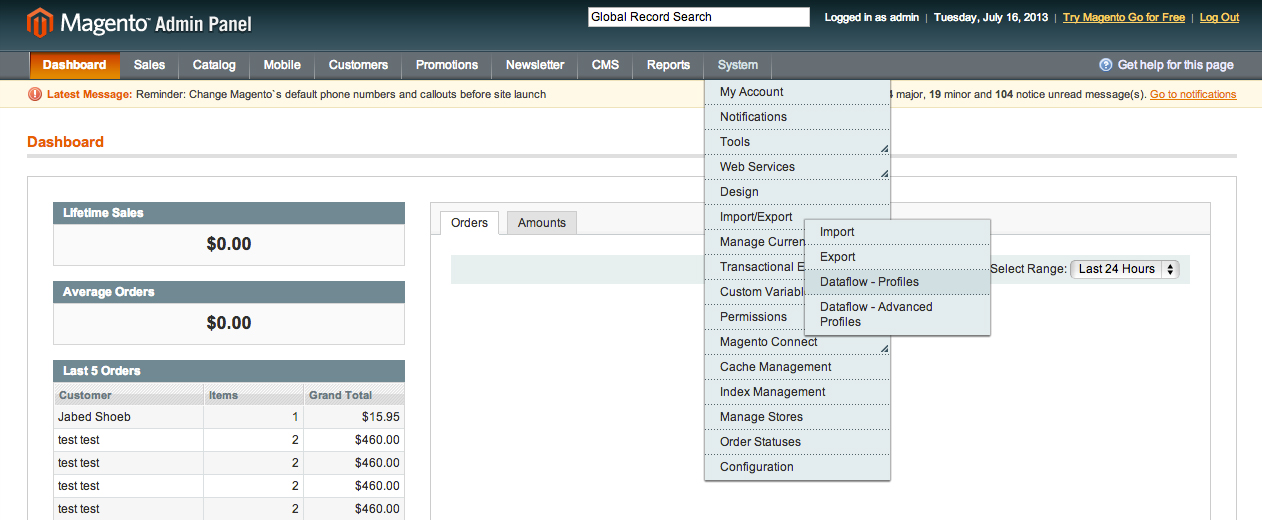
Step 1: Go to your admin panel and select the System in the menu. Then navigate to the Import/Export > Dataflow-Profiles. Here you will find a few pre-made dataflows that come with the Magento installation.

Import/Export Dataflow profile

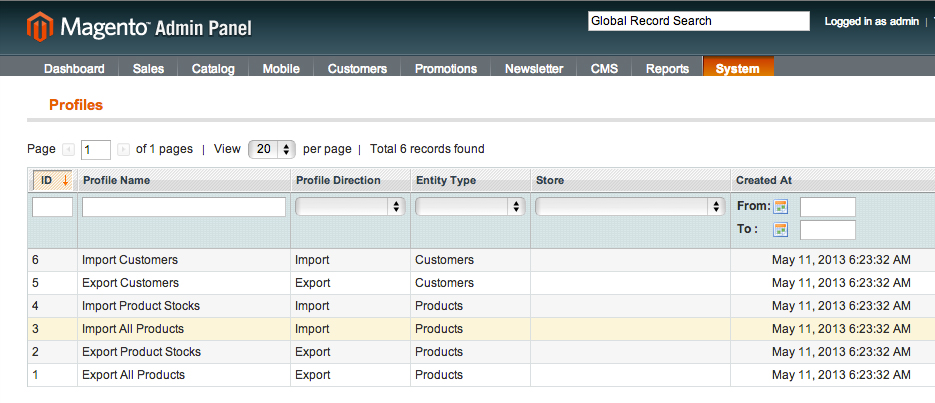
Step 2: You are now looking at the pre-made dataflow that are installed with the Magento Install. You can import/export Customers, Products, and even export Product Stocks. For this tutorial we are selecting the “Import All Products” from this menu.

Dataflow-profiles

A few pre-made import & export profiles in Dataflow Profile

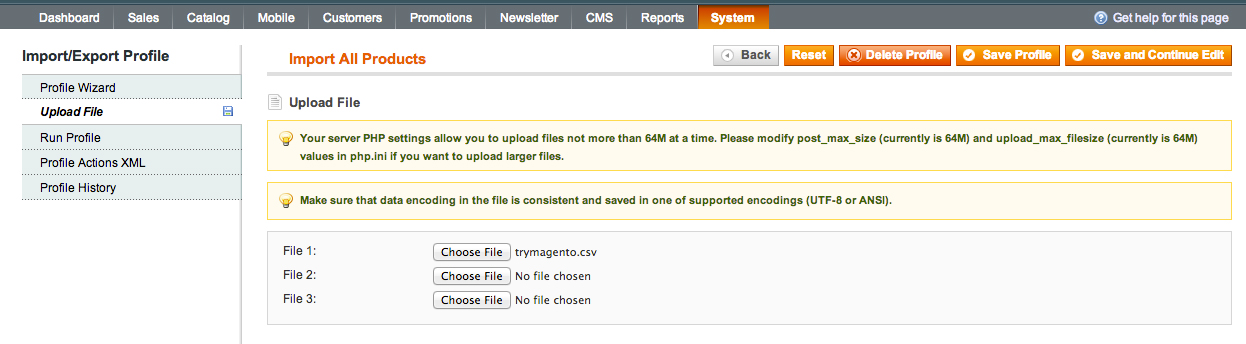
Step 3: You will need to upload your .csv or .xml file that you want to import

Dataflow-profile-upload-file

Upload file via Dataflow Profile


Step 4: Now that you have the File uploaded you now will need to select the tab “Run Profile” You will see a drop down and a button on this page. Now you will need to select your file that you previously uploaded. You will notice there are a series of numbers in front of the names of the files. These are a series of numbers that relate the time stamp the file was uploaded through the admin panel. This will prevent the system from causing an error with previous uploaded files and just creates a new one.


Dataflow-profile-run-profile

Step 5 Click the Run Profile in Popup and let the magento Dataflow go to work.

Dataflow-profile-run-profile-in-popup

Run profile in popup to import products

Please feel free to comment with any questions or comments on this.

As you know, Google Reader is shutting down on July 1st, and we’ve been pondering where to migrate our feeds. In its wake, developers working on products in the RSS ecosystem have been stepping up to deliver apps, tools and other services to fill the void.

At 19th June, 2013, one of the favorites, Feedly, renovated itself from RSS application to RSS platform, with the public debut of Feedly Cloud, the infrastructure that has been powering Feedly’s own apps and those from a small handful of approved developers.

welcome to feedly

Feedly cloud is now live, providing a fast and scalable infrastructure to seamlessly replace Google Reader. Feedly cloud also comes with a completely stand-alone Web version of feedly, that works with all major browsers. You can now access Feedly Cloud as a regular website from any browser.

The new Feedly Cloud also has an API that’s already been integrated with services such as IFTTT and gReader, so you can expect additional ways to keep plugging into your feeds.