[vc_row][vc_column][vc_column_text animation=”no_animation”]

What is browser caching?

Every time a browser loads a webpage it has to download all the web files to properly display the page. This includes all the HTML, CSS, javascript and images.

The point of using browser caching and expiry headers is to shrink the number of HTTP requests, which improves the performance for your returning visitors.

The first time someone visits your site, their browser will fetch all your images, css files, javascript files, etc. Normally that happens every time the same visitor comes back to your site.

With Expires headers you tell your website visitor’s browser that the files you stipulate are not changing until after a certain time, for example a month.

This means that the browser doesn\’t have to to re-fetch images, css, javascript etc every time your visitor comes back to your site.

Finding and Modifying .htaccess

You can access your .htaccess file through cPanel by clicking on the File Manager. When the popup box appears, click on the Web Root option and make sure that the “Show hidden files” option is checked. If you are using any FTP software, go to /public_html if the site hosted in root.

The code below tells browsers what to cache and how long to “remember” it. It should be added to the top of your .htaccess file.

Pasting in the Directives to Leverage Browser Caching

Open up your .htaccess file and paste in the following directives at the top of the file:[/vc_column_text][vc_column_text][/vc_column_text][vc_column_text]

Save the .htaccess file and then refresh your webpage.

How to set different caching times for different file types

You can see in the above code that there are time periods like “1 year” or “1 month”. These are related with file types, as an example the above code states that a .jpg file (image) should be cached for a year. If you want to change that and say you want them only cached for a month you would simply replace “1 year” with “1 month”. The values above are pretty optimized for most web pages and blogs build on top of wordpress.

Recommendations

  • Be aggressive with your caching for all static resources
  • Expiry at a minimum of one month (recommended: access plus 1 year)
  • Don\’t set your caching more than a year in advance!

You want to be cautious when enabling browser caching as if you set the parameters too long on certain files, users might not be getting the fresh version of your website after updates.

[/vc_column_text][vc_message color=”alert-warning” style=”rounded”]You want to be cautious when enabling browser caching as if you set the parameters too long on certain files, users might not be getting the fresh version of your website after updates.[/vc_message][/vc_column][/vc_row]

Identity TheftA generation ago, the only theft risk that a company need worry about involved physical theft. Today, data theft represents the most severe risk for businesses. Symantec reports that the United States has the highest cost of breaches in the world at a marker of over five million dollars.

That said, how can you minimize the threat of cyber piracy?

Secure Your Wi-Fi

When your company needs to connect mobiles, laptops, and tablets to a central Internet line, it’s necessary to have an open wireless connection that allows everyone to tap in. When that line isn’t secured, however, you run the risk of a thief piggybacking onto the network and downloading whatever contents they can find. PC World notes that specific types of file hosting services, such as File Transfer Protocols (FTPs), can be read directly over an unsecured network by anyone since they show up in plain text. Lock down a Wi-Fi network in order to make sure that anyone walking by with a signal finder cannot prey upon your vulnerability.

Password Protection

In the digital age, there’s only one gatekeeper to sensitive data like credit card information and Social Security numbers: our passwords. Despite the password representing the first and last line of defense against cyber criminals, far too few people understand the importance of creating complex, constantly-changing passwords in order to safeguard their information. SplashData notes that the most common password is still the word “password”, with “123456” coming in second place. You can make a password nearly impossible to crack by making it longer than eight letters, with capital and lower-case letters sprinkled in along with numbers and symbols.

Comprehensive Protection

Companies have every reason to encourage their employees to bring their mobile devices and laptops to work with them. A BYOD policy encourages higher morale and greater productivity. When a company fails to provide comprehensive protection for all company-linked mobiles, however, a single lost or stolen phone can bring down the entire network. Consumer Reports notes that over one and a half million cell phones are stolen annually, more than car thefts. In order to provide a safeguard for your business, you may need to ensure security over employee-owned devices. Research ways to provide fraud protection for individuals and secure the entire group. Services such as LifeLock monitors business credit and can help keep your important information safe from cyber criminals. With every individual taken care of, there’s no singular weakness for outside threats.

Trust Who You Work With

ID Theft Center created a comprehensive list of all the sources of data breaches. Their number one category, unsurprisingly, was hackers, but in second place came third-party contractors. While no business is an island and every company must work with other companies to create a successful products, knowing who you are working with can mitigate the risk of being ripped off once you pass over a company check for payment. Run background checks on whatever contractors your organization works alongside in order to make sure that they can be trusted with access to your company’s sensitive data.

Small Business You find yourself on the road more often than not for your small business, securing new contracts, networking at trade shows, and scouting out new product lines. You stuck with your laptop for mobile computing for some time, but you see more tablets popping up around you. Pew Research reports that 34 percent of adults in the United States own a tablet, a number that’s doubled since its report in 2012. Tablets represent a strong niche on their own, but they’re also capable of replacing a laptop computer entirely for a small business owner.

Mobile Data

Relying on a mobile broadband hotspot device, smartphone tethering, or the quality of hotel Wi-Fi is not the most efficient way to ensure data access when you’re away from the office. When you look at tablet options, like the Apple iPad Mini, wireless data service is included with your tablet. This gives you reliable 3G or 4G data without utilizing a smartphone or paying for an additional mobile broadband device.

Cloud-Based Applications

Cloud-based applications bring your tablet the software and functionality it needs to work as your mobile battle station. If you already use cloud-based apps on your desktop and laptop computers, chances are you have a compatible app available for the tablet. If an app isn’t available, you still have the option to access cloud-based services through the website itself. Venture Beat reports that cloud-based apps are particularly useful for tablets because you can sync data between your mobile device and your home base network, you don’t lose your data if your tablet goes missing, and it also shoulders most of the processing power burden.

Docking Stations

If you like the tablet concept but you’re not a big fan of typing on the touchscreen all the time, look into docking stations. PC World recommends a few Android tablet-compatible plug in keyboard docks that turn your tablet into a pseudo laptop, such as the Asus Transformer TF101 mobile docking station.

Budget

The iPad is at the top end of the tablet price range, going up to $900 range in certain configurations. However, many tablets like the Google Nexus 7 and Kindle Fire are significantly cheaper than the majority of laptops on the market, outside of netbooks and Chromebooks. When you’re working with a limited IT budget and want your money to go as far as possible, a tablet comes out ahead of a business laptop in almost every situation, barring software.

Battery Life

Most laptops fall well short of tablet battery lives. Cnet found that the Samsung Galaxy Tab 3, Google Nexus 7, and Microsoft Surface 2 all have more than 10 hours of battery life. Few laptops compare with that, and the all day charge is critical for small business owners who don’t get a chance to stop and sit during their busy day.

In today’s online world, everyday more than 100 million web pages are emerged, it sounds really cool for readers, but scary for the site owners. Today, obtaining consistent traffic and optimum sales figure is an imperative task. That’s why, SEO (search engine optimization) to target niche audience and increasing page-views are essential to stay ahead over the web. There are basically two ways to earn revenues on the Internet: “Advertisement” and “Selling” something.

One of the biggest challenges that website owners face these days, is to stay updated in the ocean of relevant consistent as well as latest information related to your business. Always focus on making an irresistible site, so that the reader feels guilty for “why not he bookmarks your page”. Let’s take a look at what you have missed on your website that can bespoke your site and your business as a brand name and what you need to do to improve your visibility over web.

Unique & Quality Content

Quality content is the most critical benchmark for a good website. We can say that content is a “King” of the website and it must be informative & educational to provide all the relevant information, which reader is looking for.

Let’s suppose, I am looking for information about drawing tutorials, then I want something eye-catching and interesting information. If I stumble upon “How to draw web theme” tutorial page, then I will expect that website is filled with more useful techniques and tutorials, which I want. If not, then I’ll simply leave that page without having a second thought.

quality-unique-content-signage

In content management, prefer the shotgun approach rather than a sniper approach. Losing readers directly impacts on the optimum outcome of business as well as reputation. Unless having a huge team of writer, more useful is to have an expert, who offers quality content with originality.

Thanks to Google and its algorithms, readers always have choices to seek a lot of informative content. Thus, it is your duty to write proper content and provide all the essential information to your readers.

Search Engine Optimization

If your website comes at the 10th page of Google’s search results, then who will find your site, no one.

SEO-tips-and-tricks-1

“Search Engine Optimization” is very demanding technology that can break the path of your website’s last page and help in making visibility high. It is the proven technology that interlinked with content and increase the number of audience through various links. SEO also helps in promoting products and services. Through social networking websites like Twitter, Facebook, Google+ & more, millions of people are connected these days and SEO targets prospective audience through the keywords. You need to just ensure that your site has links with other sites, which is called “deep-links” or “backlinks”.      

Try to make friendship with blogging sites and post your guest blogs to enhance the online presence. Some other techniques like pay per click and paid advertisement can also help your organization to improve your website’s search ranking or traffic. And, Google picks up these things very fast, so implement them in your business to draw maximum ROI.

Speed

I have visited many sites and observe that few sites take more than 30 seconds to load. Unless waiting for some time, I leave right away such types of sites. That sounds harsh, but it is the fact.

Now, developers has been trained to have web pages, which load instantly. Check Google.com and see how pretty fast it loads, Google takes hardly 1.8 seconds. However, Google is the most visited website in the entire world, yet it’s speed is really fast than other sites. Therefore, focus on making your own website as much fast as possible.

speed It is an easy process, you need to just “compress” and “cache” your web content, which enables page to load quickly.

Navigations and Visual Appearance

Navigation-and-visual

Having ugly website is no excuse. There is no need to pay thousands of dollars, if you have technical skills. Download various easy to use free or premium templates and make your website’s look decent and professional. Keep in mind that the aim must be simple and straight to the point.

I hope, these tips will help you in building irresistible website design.

Author Bio:

Garry Smith is a professional website designer & blogger and associated with CSSChopper. He spent his most of the time in designing creative and innovative sites, additionally writing blogs related to web designing to provide easy and interactive tips.

As a small business owner you may well be under the impression that owning your own website is simply not worth the cost and effort in terms of maintenance and running. However if you speak to a Miami web design company for instance, they’ll suggest that because you’re a small business, this is exactly why you should have a website. Here’s why?

Convenience:

Regardless of how local you may think your business is, there’s a pretty good chance that someone somewhere in the world wants exactly what you have to offer. These being the case then why not give it to them? By having a company website they can access your products or services from the comfort of their own home and what’s more important, they can access it 24/7. In addition to this, it allows your existing customers to access your business out of working hours offering a more convenient service. 

Small Business

Your customers expect!

In the 21st century customers are far more shopper savvy. Here’s a case in point! In a recent survey carried out by Google in conjunction with research group Shopper Sciences, it was found that as many as 88% of consumers carried out some form of online research before they bought a product. Not only this, it was found that each consumer consulted an average of 10.4 sources in order to compare prices and find the best deal, before even contemplating parting with their cash. In essence, customers expect a business, no matter how small, to have a virtual presence. Any that don’t are really missing out big time.

Puts you on the map:

The great thing about the internet revolution is that it allows small businesses to compete directly with large organizations on a level playing field. This is something they never could have done before. By employing cost effective strategies in conjunction with practices such as social networking or search engine optimization Miami, New Jersey, and Chicago based companies for example, can help to get your business noticed and effectively put you on the map.

Some small businesses are clearly happy just ticking along and aren’t necessarily looking to expand and for those people then it’s fair to say that a website probably isn’t going to help. However for those who are really looking to grow their business, build a solid customer-focused relationship and grow sales, then it really should be a priority.

Finally here’s another statistic to finish – in 2012 according to a survey carried out by Ado-logy 46% of small businesses who say they want to be more successful don’t have a website! Do you want to be part of this statistic?

Author Bio:

John Mathew manages content for Miami Web Design, a website designing and development company. He loves to share ideas for building a more profitable website by writing on e-commerce and web designing. He also writes on the latest needs for designing a website.

Migrating a WordPress site to new url or domain, live or to a production/development server, new URL strings in the mySql database need to be changed and updated in various database tables.

This method is work when you like to move whole mysql database via phpmyadmin instead export/import all within wordpress admin. So you would copy/move all wordpress files/folder to new destination, set the correct ownership to those files and than start work on database.

Old url to New url change within phpmyadmin

  1. Export database from old server.
  2. Create a new blank database on New Server
  3. Import old database via phpmyadmin import wizard
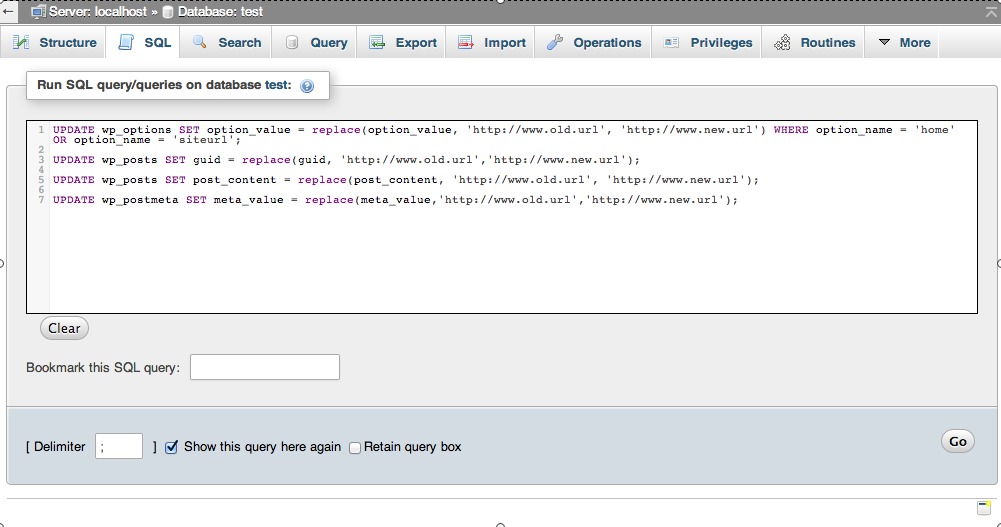
  4. Use the code as below in sql query and change in your old and new URLs, no trailing slashes.

UPDATE wp_options SET option_value = replace(option_value, 'http://www.old.url', 'http://www.new.url') WHERE option_name = 'home' OR option_name = 'siteurl';
UPDATE wp_posts SET guid = replace(guid, 'http://www.old.url','http://www.new.url');
UPDATE wp_posts SET post_content = replace(post_content, 'http://www.old.url', 'http://www.new.url');
UPDATE wp_postmeta SET meta_value = replace(meta_value,'http://www.old.url','http://www.new.url');

replace old url to new url

Finally update wordpress config file to reflect the new database, “wp-config.php” should be in your web document root – change, database name, ursername, password and host values:

define('DB_NAME', ‘dbname');
/** MySQL database username */
define('DB_USER', 'username');
/** MySQL database password */ d
efine('DB_PASSWORD', 'password');
/** MySQL hostname */
define('DB_HOST', 'localhost');

Now everything should be fine.

Internal and external linking is an important part of effective SEO. It also means that you need to master the art of using anchor text for your advantage.5 Clever Tips For Using Anchor Text Successfully

The importance of correct anchor text use is constantly increasing and it is time to start looking closely at the way you use anchor texts on your website.To help you use anchor text successfully here are five clever tips to take on board.

1. Understand Keywords

The most basic thing to know about anchor text is that it should really be all about the keyword you want to highlight. So getting some basic understanding of what keywords are is highly critical in order to succeed.

What anchor text as a keyword really means is that you should move away from anchor texts like “click here” and “this link”. If you want to direct the reader to somewhere else then use descriptive anchor texts like “best summer shoes” and “young person’s car insurance”.

2. Avoid The Homepage

It is also much better SEO to use the anchor text to locate the reader to somewhere else rather then the homepage. If you just keep directing the person onto your homepage the reader isn’t really going to benefit from it and the search engines can even penalise you.

So always think about a different site to transfer the reader to. Naturally, since your link should provide them with more detailed information on the subject you are talking about it should go somewhere on the site that deals with this dilemma further.

3. Don’t Spam The Anchor Text

You also should try to avoid using the exact same anchor text and link within your content. Search engines like Google penalise against this and therefore being original with your anchor text is highly recommended.

It doesn’t mean that the anchor text needs to be completely different. Just change a few words from here and there and you are good to go. Make sure you also keep linking to multiple different locations on your website and not just that one page.

4. Long-Tail Link Building

You shouldn’t be afraid of using long-tail anchor text on your content. Although it is a good idea to have a mixture of both you can really boost your SEO with long-tail links.

There is a good article for creating effective long-tail links at the Explicitly.me website. Give the article a thorough read and take the tips on board. Make sure that you try out long-tail links but don’t only include them on your content.

A variation of anchor texts always brings the best results for your website.

5. Context Is Everything

Above all you really need to focus on the context. The links you are using should always relate to the link and the things you are talking about. If you have a blog post on musical instrument, for instance, you don’t want to redirect the reader to read about car insurance.

Be creative with your content and the way you use links but always keep the context in mind. The search engines might not penalise you but the people reading your content will not come back.

Featured images:

Irene Taylor loves to find better ways to use SEO. She likes to test the best SEO tools on the internet and is always looking for new SEO blogs to follow. She also loves to travel and is currently planning a trip to China.

Many people with only a basic standing of SEO need more information about how SEO can best be used, when articles are being written. The best methods are not taught in courses online, and they aren’t pulled from downloaded Internet manuals. The best teacher is experience, as a writer and in the SEO business.

How Hard Is it to Write an SEO Article?

There isn’t a magical science to SEO, and there is no one perfect way to write a positive SEO article. There are guidelines to follow, though, to make it easier for people to find your articles. SEO writing has a lot to do with common sense, and applying simple points that are based on well-constructed articles.

Writing SEO articles isn’t any more complicated than writing standard articles for magazines. There are different factors that should be considered. The basics for writing a quality article are fundamentally the same.

Get it Right

Whether you are writing for your own site or as a freelancer, the best SEO articles are always good articles, first. This means that the article needs to be useful to the people who reads it. It should give them a benefit that they are able to visualize, or offer them something valuable that is relevant and applicable to their businesses or lives. They should be able to easily relate to the content.

Subject Matter Is Everything

A technically great SEO article, even in attractive WordPress themes, that is not of interest to your readers is not an effective article. Your website will lose potential customers or lose traffic and revenue from advertising. The article, if only written to be SEO compliant, will waste everyone’s time. If the article is not interesting, it won’t be linked to or picked up by link marketers, affiliates or anyone else. An article that is of interest to potential customers will boost the rankings of your site. Write for the people who will be reading your article.

Components of SEO

SEO articles must include two important components:

  • They must contain value-added and relevant content.
  • They must be supported by good infrastructure on the website.

SEO articles must have keyphrases and keywords that are topic-specific. They should be within the article seamlessly, so that they don’t disrupt the natural flow. In fact, the keywords should enhance an article and also be inconspicuous.

Keyphrases and Keywords

There is no exact science that teaches the way to figure out what keywords should be used within a given article, so that it will come up in the results of search engines. Forget all about keyword software and Adwords®. These are designed by people who want to make some money giving you the basic instruction you can learn yourself online.

Isolating Keywords

Sit down with a pen and notebook. Write down any phrases and words that relate to the business interest or subject on which you are writing. Most of these should be used in the web page’s Meta data, and some can be used in an SEO article.

It sometimes happens when you write an SEO article that you are given keywords to include. This is acceptable, meaning that someone else has determined the words to use. You still need to write an article of quality, and embed the proper keywords in the text. Including the proper keywords or keyphrases is not difficult, nor is utilizing hypertext links in your text. The “tech” part comes after the articles have been written. They need to be analyzed, to see how effective they will be in bringing in more readers to your site.

About author
Anny Solway is a dedicated writer at ThemeFuse – a web studio that creates original WordPress templates, that can be used out of the box. She loves to share blogging and technology  tips.

As we know Tumblr, which was recently acquired by Yahoo, 300 million unique visitors per month, and more than new 125,000 daily registers. To assist advertisers take advantage of on this growth, the blogging policy is kicking off the New Year with a foremost upgrading to its advertise platform. This is not just Tumblr’s first update into sponsored posts. Previous year the system begins presenting an ad on its Radar, a segment of the dashboard observable to all users on Tumblr. And the end of 2013 the Tumblr launched sponsored posts into its mobile interface.

As part of its totally refurbished ad solution, Marissa Mayer declared that Tumblr Sponsored Posts are now powered by Yahoo Advertising. As an effect, organizations and media shoppers will have an additional sleek way to purchase ads on Yahoo partner sites like Tumblr and finally, Flickr.

Yahoo CEO Marissa Mayer publicize on 7th January, 2014 in Las Vegas new prime ads for Tumblr powered by Yahoo Ads, a Yahoo Audience Ads system to aim ads across Yahoo and associate sites, in addition to a new Yahoo Tech site, a Yahoo News Digest applications and much more.

“The internet advertising world nowadays is fragmented, tricky to navigate and not for all time user friendly” official statement of Yahoo. Exterior of the ads unit, Burke said Yahoo is launching a new Ad Manager, which is expected to provide advertisers straight right of entry to the businesses ad product or service, not considering of what company’s size small, medium or large. Along with a latest Yahoo Ad Exchange an open forum for systematic ad-buying.

Mayer coming back for speaks about main parts of search, communications, digital magazines, and video. They are “powered by two incredibly vital engines” Flickr and Tumblr. Mayer describes Tumblr, one of the extremely influential publishing platforms on the web and the intelligence behind the fresh digital magazines. She extols of founder David Karp and she requests him to come up to the stage. Karp comes on stage and speaking about how engagement goes like a bullet by 55% previous year and 250% when speaking about especially mobile.

Yahoo is also growing some of the advertising tools on Tumblr

David Karp said that the usual Tumblr post was re-blogged fourteen times but that the average sponsored Tumblr posts which is an ads was re-blogged ten thousand times. The company is now going to join together Yahoo Advertising peculiarity into those Tumblr sponsored posts that will permit advertisers to targeting their audiences by gender, geographically and other data point of views.

The Big Deal in Features

  • Tailored audiences: This feature allows targeting your audience by gender and location.
  • Pay for engagement: You can only charge for any action such as re-blogs, likes, follows and clicks on the sponsored post.
  • Guesswork testing: Advertisers can check some manner and then focus that campaign which creative style performs finest.
  • Analytics tools: Use this features for tracking demographic data and measuring outcome.

The power of a Sponsored Post

  • 60% of Tumblr users who have seen Sponsored Posts locate the content fun, engage and top quality.
  • 70% of customers feel that a brand additional popular after seeing a Sponsored Post.
  • 50% of users who saw Sponsored Posts studied the sponsor afterward.

“We are excited to launch these enhanced abilities to the salient creative work and native advertising experience that describe sponsorships on Tumblr” said Karp. This is wherever advertise is really enjoyable and we designed on keeping it that way.

These latest Yahoo Advertising products present businesses and advertisers the mainly engrossing ways in the marketplace to exactly target campaigns, use data and insights from Yahoo, advertisers and third parties. For the reason that Yahoo is at the middle of people’s daily behavior across search, communications, media and videos so they can offer inimitably powerful insights on customer behaviors.

About Author: John and Jeremy provide best social media training on Facebook, Twitter and YouTube presence. They are dynamic and energetic Social Media Speakers and Founders of the Social Expert Academy.